
Here for the Labrador platform itself? It has its own site: testwithlabrador.com.
We built the software our audits run on.
The Labrador platform guides our WCAG conformance testing: it is the reason our audits arrive consistent, evidenced, and genuinely readable. We built it for our own needs first. Today it’s also a product other consultancies use, and every engagement you buy from us gets the full benefit of it.
The export your team actually reads
Every audit ships as an interactive HTML report generated straight from the tested record. Filter findings by page, severity, or criterion; follow any finding to the exact success criterion it fails; see every claim sitting beside its evidence. One self-contained file your whole team can open.
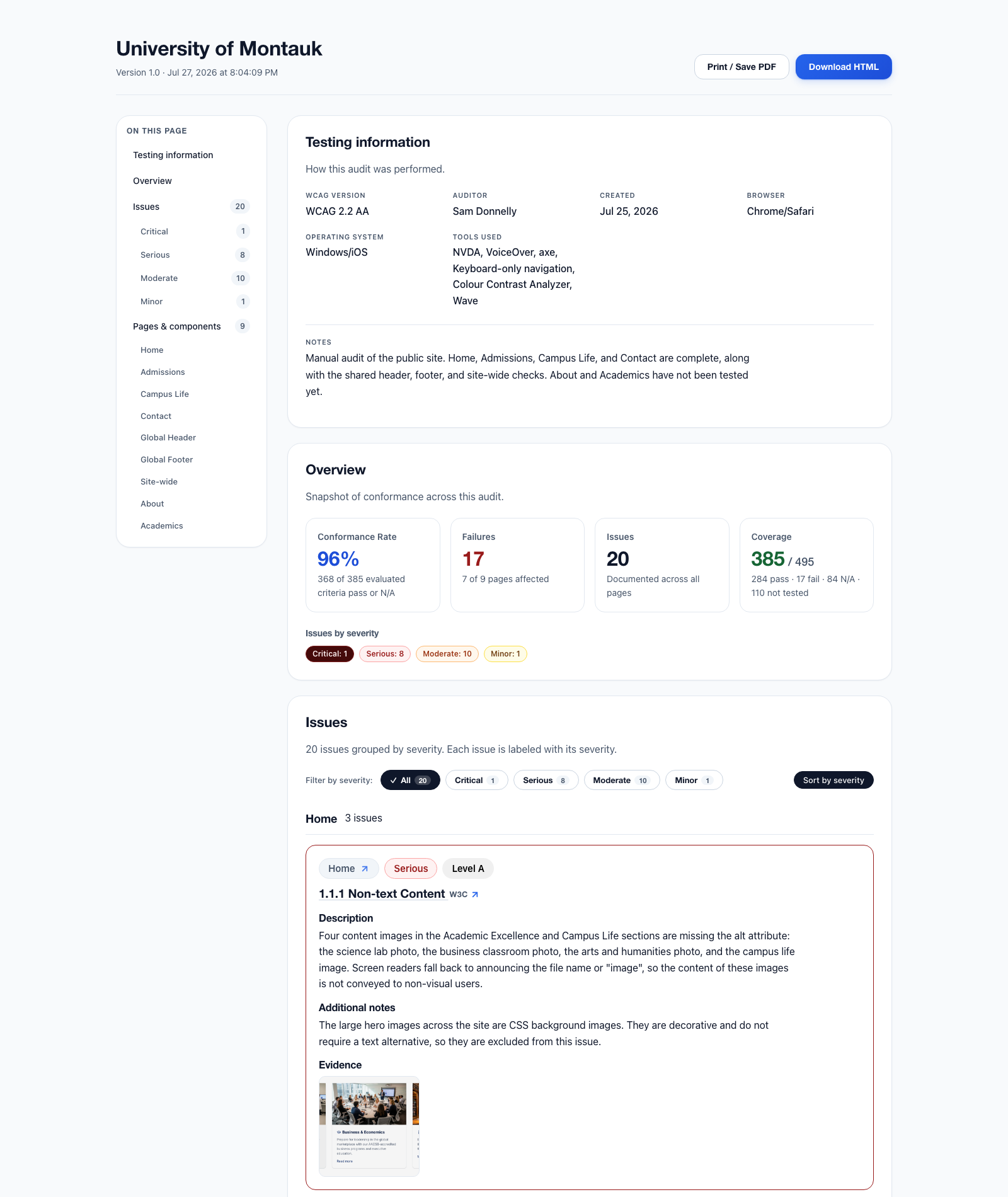
One self-contained HTML file, about 30 MB
The sample is a real audit of University of Montauk, a demonstration site we built so we could audit it in the open, and it is captured mid-engagement: some pages are tested end to end, others are still queued, and the report states plainly which is which. That candour is the product. Every filter, link, and piece of evidence in the download works exactly as it does in the reports our clients receive.
Developers actually enjoy working with these audit reports rather than scrolling spreadsheets. Our favorite review so far: an agency developer who, after one audit with our most recent format, asked whether the other auditors they work with could switch to the Labrador platform too.
What it changes about your audit
The Labrador platform is why the quality of our work survives contact with deadlines. Four things it locks in:
-
Guided, criterion by criterion
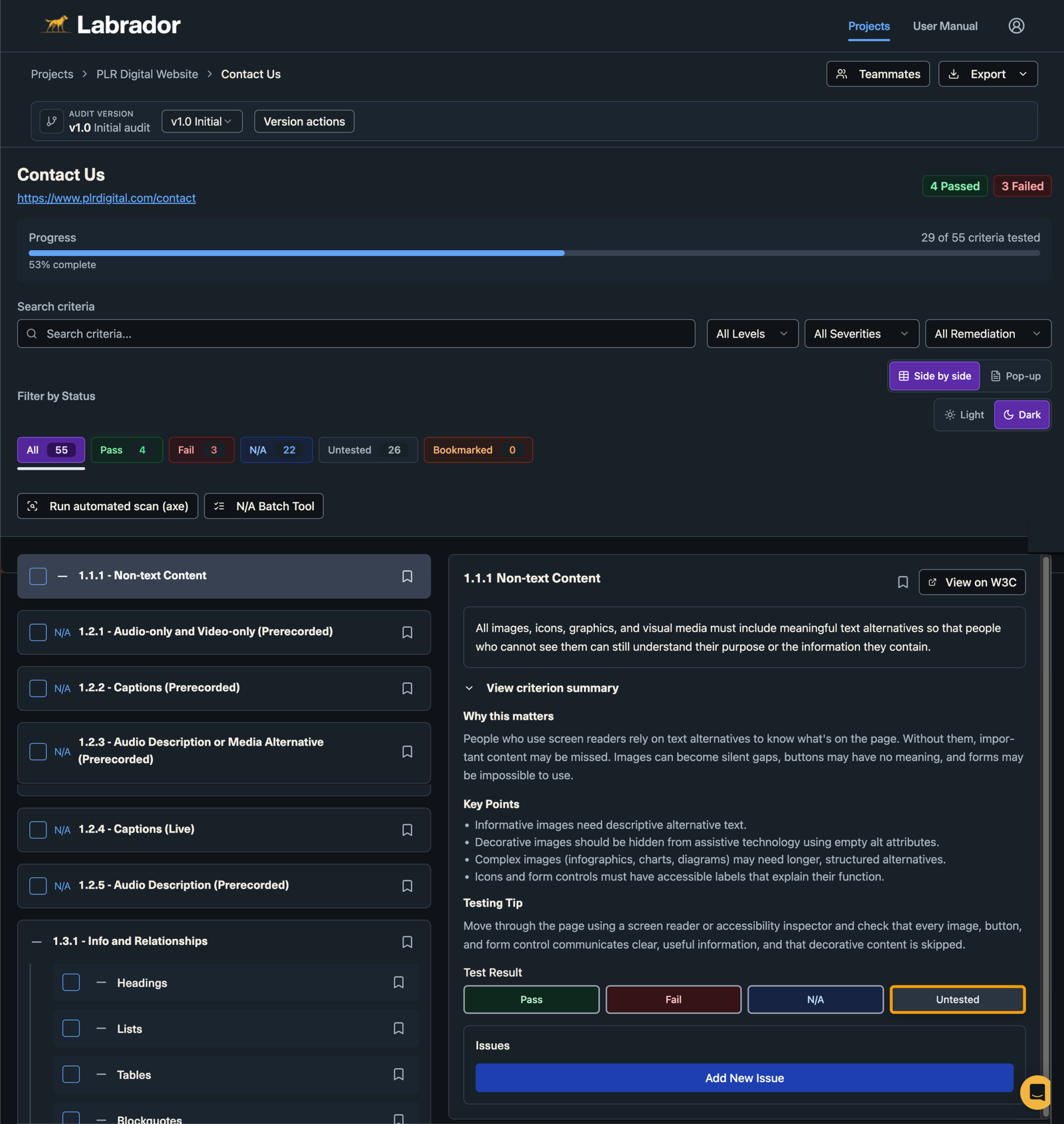
Testers work all 55 WCAG 2.2 AA success criteria in order, page by page and component by component. Every criterion carries a plain-language summary of what it requires, why it matters, and how to test it, with the official W3C guidance one click away. Nothing gets skipped because someone was tired on a Thursday.
-
Evidence lives with the finding
Screenshots and video attach to the finding they document. The report is generated from that record, never retyped into it, so nothing is lost between the testing and the delivery.
-
An export for every audience
Reviewers get the interactive HTML report. Procurement gets a DOCX VPAT. Developers get both routes into Jira: a Jira-ready CSV export, and a direct Jira integration that moves findings into the backlog with no file in between. And when someone just wants a spreadsheet, a plain CSV opens clean in Excel or Google Sheets.
-
Remediation, tracked to the end
Every finding carries a remediation status through to the re-test, so “are we done yet?” always has a current, honest answer.
Every criterion, explained before it’s tested
This is the working view behind every audit. The Labrador platform walks a page through all 55 WCAG 2.2 AA success criteria in order, keeps score as each one is tested, and puts the relevant part of the standard beside the work instead of in another tab.
Where it stops
It structures manual testing; it replaces nothing.
The Labrador platform never runs on your site. It is not a widget, not an overlay, and nothing about it touches your code: it is the workbench our auditors test at, and the exports are what leave it.
The judgment stays human. The platform decides nothing about your conformance; it makes sure the people who do decide are looking at everything, in order, with the evidence in reach.
For your own team
The Labrador platform is a product, too.
We built it for our own needs, then opened it up: accessibility consultants and in-house teams now use it for guided WCAG 2.1 and 2.2 testing without the spreadsheet sprawl. There’s a free plan, and no credit card to start.
Plans, a demo, and everything else about the platform live on testwithlabrador.com.
Start a conversation
Say hi (opens chat)
Tell us what you’re building, and we’ll tell you how we can help. Our founding team spans Maine, Wales, and Delhi, so someone’s online through most of your working day. Expect a scoped, fixed-fee proposal within 2 business days. A call is welcome, never required.